
.png)
Description
Download AI Content Detector by Leap – free AI detection, secure online tool, quick analysis
What Is AI Content Detector by Leap?
AI Content Detector by Leap is a cloud‑based verification utility that helps writers, editors, educators, and digital marketers quickly determine whether a piece of text was generated by an artificial‑intelligence model or authored by a human. In today’s content‑driven landscape, large language models such as GPT‑4, Claude, and LLaMA can produce high‑quality prose at a click, making it increasingly difficult to discern authentic human voice from machine‑crafted output. Leap’s detector tackles this challenge by offering a clean, intuitive web interface where users paste up to 5,000 characters, click “Analyze,” and receive a confidence score that reflects the likelihood of AI involvement. The score is accompanied by a color‑coded indicator—green for likely human‑written, amber for mixed, and red for probable AI‑generated—plus a brief explanation of the factors influencing the result. Beyond the core detection engine, Leap bundles complementary tools, including a Lead Research Assistant and an SEO Topic Cluster Generator, turning the platform into a mini‑hub for content creation, research, and optimization. While no detector can claim absolute certainty—especially as AI models evolve—Leap’s team continuously refines its algorithms, delivering weekly model updates that keep detection accuracy on pace with the latest generative technologies. Whether you are a freelance copywriter protecting your reputation, a university professor safeguarding academic integrity, or a brand manager ensuring authentic communication, AI Content Detector by Leap provides a fast, secure, and cost‑free method to verify content credibility.
Key Features & Extended Toolkit
- Instant AI‑Detection Score: Paste up to 5,000 characters and receive a percentage‑based likelihood that the text was generated by AI.
- Multi‑Model Compatibility: Engineered to recognize outputs from popular models such as GPT‑4, Claude, LLaMA, and emerging open‑source generators.
- Lead Research Assistant: Generates qualified leads based on keywords, saving hours of manual prospecting.
- SEO Topic Cluster Generator: Uses AI to suggest pillar topics, sub‑topics, and long‑tail keywords that improve topical authority.
- Batch Analysis (Pro Plan): Upload CSV files to evaluate dozens of paragraphs simultaneously.
- Privacy‑First Architecture: All text is processed in‑memory; no content is stored on servers after analysis.
- Real‑Time Updates: The detection model is refreshed weekly to keep pace with the latest AI advancements.
- Cross‑Platform Accessibility: Works on any modern browser, eliminating the need for installations or plugins.
The breadth of these capabilities is intentional. While the core AI detector remains the flagship function, the ancillary utilities transform Leap into a one‑stop shop for content creators who need both verification and inspiration. For instance, a marketer can first confirm the authenticity of a draft blog post, then seamlessly switch to the Topic Cluster Generator to map out supporting articles, all without leaving the same web page. This integrated workflow reduces tool‑switching friction, shortens project timelines, and helps teams maintain a consistent brand voice. Moreover, the privacy‑first design—processing data only in RAM and automatically purging it after each session—addresses a common concern among users who handle sensitive or proprietary text. In practice, the combination of accurate detection, ongoing model enhancements, and value‑added research tools makes AI Content Detector by Leap a compelling choice for anyone who relies on trustworthy content in their daily operations.
Installation, Usage Instructions, and Compatibility
How to Get Started (No Download Required)
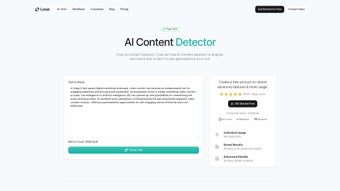
Because AI Content Detector by Leap is a cloud‑hosted web app, there is no traditional installation process. Users simply navigate to leap.ai/content-detector using a supported browser, accept a brief terms‑of‑service prompt, and are ready to analyze text. The interface consists of three main panes: a text input box, an analysis button, and a results panel that displays the AI‑likelihood score together with a short confidence narrative.
Step‑by‑Step Usage Guide
- Open the website on a desktop, laptop, or mobile device.
- Copy the text you wish to evaluate (up to 5,000 characters for the free tier).
- Paste the content into the large white box.
- Click the bright “Detect AI” button.
- Wait 2‑5 seconds while the backend model processes the input.
- Read the displayed score; green (< 30 %) indicates human‑written, amber (30‑70 %) suggests mixed, and red (> 70 %) signals likely AI‑generated.
- If needed, export the result as a PDF, copy the summary to your clipboard, or share a direct link to the analysis.
Supported Operating Systems
- Windows 10/11 – any modern browser (Chrome, Edge, Firefox)
- macOS 11+ – Safari, Chrome, Firefox
- Linux distributions – recent Chromium‑based browsers
- Android 8+ – Chrome, Firefox
- iOS 13+ – Safari, Chrome
Since the service runs entirely in the cloud, performance hinges on internet speed rather than local hardware. Users on slower connections may notice a modest delay, but Leap’s infrastructure is optimized for low‑latency responses even on mobile networks. For developers, Leap also offers an API key that enables integration of the detection engine into custom workflows, CMS plugins, or server‑side applications written in Node.js, Python, or Java. This API expands compatibility beyond the browser, making the tool useful for automation pipelines, editorial dashboards, and enterprise‑level content governance systems.
Pros & Cons – Balanced Evaluation
Pros
- Free core detector with a generous 5,000‑character limit per request.
- No software download; works instantly in any modern browser.
- Privacy‑centric architecture: data is processed in‑memory and not retained.
- Weekly model updates keep detection current with the latest AI releases.
- Additional utilities (Lead Research, SEO Cluster) provide tangible extra value for marketers and creators.
- Cross‑platform accessibility across Windows, macOS, Linux, Android, and iOS.
- API access enables seamless integration into custom workflows.
Cons
- Free tier caps analysis at 5,000 characters per request, which may be limiting for long documents.
- Detection accuracy can dip with heavily edited AI‑generated text or hybrid human‑AI content.
- Batch processing and higher character limits require a paid Pro subscription.
- Internet connection is mandatory; there is no offline mode.
- While privacy‑focused, the service still processes data on remote servers, which some ultra‑sensitive organizations may find uncomfortable.
Frequently Asked Questions & Final Verdict
FAQ – Your Most Common Questions Answered
Is AI Content Detector by Leap truly free?
Yes, the basic detection feature is completely free with no hidden fees. A paid Pro plan is optional for higher limits and batch analysis.
Can the tool detect content from the newest AI models?
Leap updates its detection algorithms weekly, aiming to recognize outputs from the latest publicly released models, including GPT‑4 Turbo and Claude 3.
How does Leap protect my privacy?
All text is processed in‑memory and automatically purged after the analysis completes. Leap does not retain any submitted content in its logs.
What browsers are supported?
Any modern browser that supports JavaScript and HTTPS – Chrome, Edge, Firefox, Safari, and their mobile equivalents.
Can I integrate the detector into my own workflow?
Yes, Leap offers an API with token‑based authentication, allowing developers to call the detection engine from custom scripts, CMS plugins, or internal tools.
Final Verdict and Call to Action
AI Content Detector by Leap strikes a solid balance between accessibility and depth. The free, no‑install approach lowers the barrier for anyone who needs a quick authenticity check, while the added research and SEO utilities provide tangible extra value for professionals. Although the tool is not infallible—no AI detector ever can be—it delivers reliable scores that are sufficient for most editorial, academic, and marketing scenarios. If you’re looking for a trustworthy, privacy‑first solution that evolves alongside the AI landscape, give Leap a try today. Simply visit the website, paste your text, and see the results in seconds. Power users who need batch uploads or higher character limits may consider the Pro plan for an even smoother experience. Keep your content genuine—download AI Content Detector by Leap now and stay ahead of the AI curve.
Overall Rating: 4.5 / 5
Guides & Tutorials for AI Content Detector by Leap
How to install AI Content Detector by Leap
- Click the Preview / Download button above.
- Once redirected, accept the terms and click Install.
- Wait for the AI Content Detector by Leap download to finish on your device.
How to use AI Content Detector by Leap
This software is primarily used for its core features described above. Open the app after installation to explore its capabilities.
User Reviews for AI Content Detector by Leap 0
No reviews found




